NOTE
The
.obsidian/pluginsfolder houses the vault’s installed Obsidian plugins.
Vault Plugins
TIP
This document’s table is automatically generated using the Get-ObsidianVaultPlugins.ps1 Script.
| Name | Version | Description |
|---|---|---|
| Automatic Table Of Contents | 1.7.3 | Create a table of contents in a note, that updates itself when the note changes |
| Better Word Count | 0.10.1 | Counts the words of selected text in the editor. |
| Calendar | 1.5.10 | Calendar view of your daily notes |
| Code Styler | 1.1.7 | Style and customize codeblocks and inline code in both editing mode and reading mode. |
| Convert url to preview (iframe) | 0.5.0 | Convert an url (ex, youtube) into an iframe (preview) |
| Dataview | 0.5.68 | Complex data views for the data-obsessed. |
| DB Folder | 3.5.1 | Folder with the capability to store and retrieve data from a folder like database |
| Editing Toolbar | 3.1.18 | The Obsidian Editing Toolbar is modified from cmenu, which provides more powerful customization settings and has many built-in editing commands to be a MS Word-like toolbar editing experience. |
| GitHub Copilot | 1.1.8 | Implement GitHub Copilot services (suggestion and chat) in Obsidian |
| Google Drive Sync | 2.2.2 | Syncs a vault into Google Drive for cross-platform use (works for iOS). |
| Homepage | 4.2.2 | Open a specified note, canvas, base, or workspace on startup, or set it for quick access later. |
| Lazy Plugin Loader | 1.0.21 | Load plugins with a delay on startup, so that you can get your app startup down into the sub-second loading time. |
| Mermaid Tools | 1.3.0 | Improved Mermaid.js experience for Obsidian: visual toolbar with common elements & more |
| Metadata Menu | 0.8.10 | For data quality enthusiasts (and dataview users): manage the metadata of your notes. |
| Natural Language Dates | 0.6.2 | Create date-links based on natural language |
| Advanced URI | 1.46.0 | Advanced modes for Obsidian URI |
| Clipper | 0.2.9 | This plugin helps you capture highlights from the web. |
| Dictionary | 2.22.0 | This is a simple dictionary for the Obsidian Note-Taking Tool. |
| Full Calendar | 0.10.7 | Obsidian integration with Full Calendar (fullcalendar.io) |
| Git | 2.35.2 | Integrate Git version control with automatic backup and other advanced features. |
| Google Calendar and Contacts Lookup | 1.6.0 | Import contact and calendar event information from your Google account |
| Imgur | 2.6.3 | This plugin uploads images from your clipboard to imgur.com and embeds uploaded image to your note |
| Local REST API | 3.2.0 | Get, change or otherwise interact with your notes in Obsidian via a REST API. |
| Mind Map | 1.1.0 | A plugin to preview notes as Markmap mind maps |
| Pandoc Plugin | 0.4.1 | This is a Pandoc export plugin for Obsidian. It provides commands to export to formats like DOCX, ePub and PDF. |
| Plugin Groups | 2.1.0 | Manage your Plugins through groups: Enable and disable multiple plugins through a single command, or delay the startup of plugins to speed up your Obsidian start up time. |
| Plugin Update Tracker | 1.7.0 | Know when installed plugins have updates and evaluate the risk of upgrading |
| Raindrop Highlights | 0.0.24 | Sync your Raindrop.io highlights. |
| Style Settings | 1.0.9 | Offers controls for adjusting theme, plugin, and snippet CSS variables. |
| Vault Changelog | 1.2.0 | Maintain a changelog of recently edited notes |
| Wikipedia | 1.0.3 | Grabs information from Wikipedia for a topic and brings it into Obsidian notes |
| Zotero Integration | 3.2.1 | Insert and import citations, bibliographies, notes, and PDF annotations from Zotero. |
| BRAT | 1.3.2 | Easily install a beta version of a plugin for testing. |
| Open vault in VSCode | 1.4.1 | Ribbon button, command and file explorer context menu to open the vault as a Visual Studio Code (VSCode) workspace |
| QuickAdd | 2.8.0 | Quickly add new pages or content to your vault. |
| Readwise Official | 3.0.1 | Official Readwise ←> Obsidian integration |
| Recent Files | 1.7.4 | List files by most recently opened |
| Settings Search | 1.3.10 | Globally search settings in Obsidian.md |
| Smart Connections | 3.0.80 | Chat with your notes & see links to related content with Local or Remote models. |
| Advanced Tables | 0.22.1 | Improved table navigation, formatting, manipulation, and formulas |
| Tag Wrangler | 0.6.4 | Rename, merge, toggle, and search tags from the tags view |
| Templater | 2.16.2 | Create and use templates |
| Terminal | 3.20.0 | Integrate consoles, shells, and terminals. |
| Todoist Sync | 2.2.1 | Materialize Todoist tasks within Obsidian notes. |
| Paste URL into selection | 1.11.4 | Paste URL “into” selected text to create markdown links. |
Plugin Configuration & Version Control
Git Tracking Strategy
The .obsidian/plugins/ folder uses a selective approach:
- Tracked:
manifest.jsonfiles (plugin metadata) and safedata.jsonconfigurations - Ignored: Plugin code (
*.js,*.css) - auto-downloaded from repos - Ignored: Secret-containing
data.jsonfiles - see below
Plugins with Secrets
These plugins store API keys or credentials in data.json and are excluded from version control:
| Plugin | Secrets |
|---|---|
| Copilot | OpenAI, Anthropic, Google API keys |
| Local REST API | API key, SSL certificates |
| Imgur | Client ID |
| Smart Connections | AI service API keys |
| Readwise Official | API token |
| Raindrop Highlights | API token |
| GitHub Copilot | Auth tokens |
| Google Drive Sync | OAuth tokens |
| Google Lookup | Google API key |
Native Keychain Support
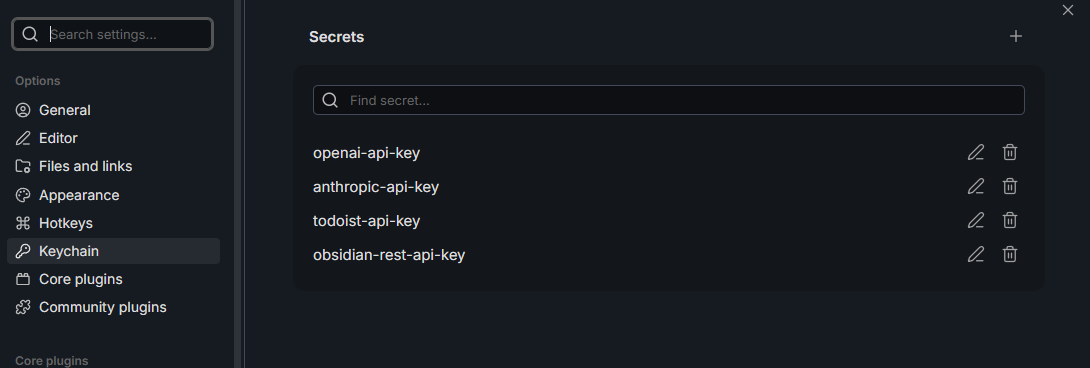
Obsidian provides a native Keychain feature (v1.8+) at Settings > Keychain for secure secret storage using OS-level encryption (macOS Keychain, Windows DPAPI, Linux secret stores).
The Plugin API for Keychain is still being developed, so not all plugins support it yet.
Secrets stored in this vault’s Keychain:
openai-api-key- Used by Copilot, Smart Connectionsanthropic-api-key- Used by Copilottodoist-api-key- Used by Todoist Syncobsidian-rest-api-key- Used by Local REST API
WARNING
Keychain secrets are machine-local and do not sync. After cloning this vault on a new machine, re-enter all secrets in Settings > Keychain.
See the image below for reference:
For full details, see Plugins README.
Appendix
Note created on 2025-11-26 and last modified on 2025-12-26.
See Also
Backlinks
(c) No Clocks, LLC | 2025